
Best PowerPoint Timer Add-in for Presentations & Events (2026)
Professional timing for live presentations, conferences, and events — directly in PowerPoint.
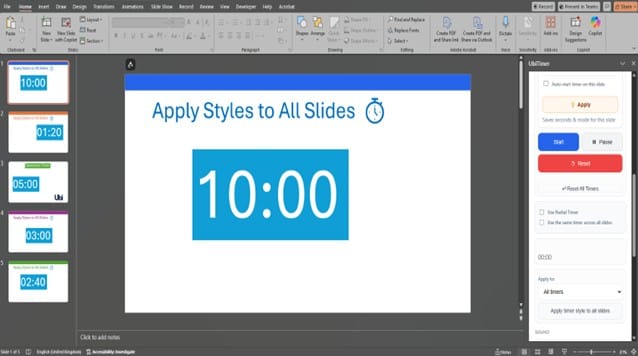
Running live presentations or events with PowerPoint puts timing under pressure. Sessions overrun, speakers lose track, and organisers are forced to interrupt.
A professional PowerPoint timer add-in makes time visible, controlled, and reliable — without disrupting the presentation.
UbiTimer is designed for presentations, conferences, events, panels, and formal sessions where timing accuracy and presentation quality matter.
Why the best PowerPoint timer add-in is better than built-in timers
- Slide timers reset when slides change
- Animations desynchronise in Slide Show mode
- Timings are not clearly visible to presenters or audiences
- Adjusting time mid-presentation is awkward or disruptive
- External timers break presentation flow
For professional events, these limitations quickly become operational problems.
What a professional PowerPoint timer add-in for presentations needs
- Consistent timing across multiple slides
- Clear visibility without distracting from content
- Pause, resume, and adjustment controls
- Offline operation for venues with limited connectivity
- Clean integration with professional slide designs
- Reliable performance on Windows and macOS
UbiTimer was built to meet these real-world presentation requirements.
Why UbiTimer is ideal for presentations & events
⏱️ Global timing across the entire presentation
Run a single timer that continues smoothly across slides — ideal for keynote talks, panel sessions, and timed segments.
🎤 Presenter-friendly control
Pause, resume, or reset the timer discreetly without breaking the presentation flow.
🖥️ Clean, professional on-screen display
Choose subtle placement or clear visibility depending on your event format — with no pop-ups or ads.
📶 Reliable offline operation
UbiTimer runs locally inside PowerPoint, making it suitable for conference venues, auditoriums, and secure environments.
🔁 Cross-platform reliability
Designed to work reliably on supported versions of PowerPoint for Windows and macOS.
Ideal for professional presentation environments
- Conferences and keynote presentations
- Corporate meetings and briefings
- Sales presentations and product demos
- Training sessions and workshops
- Panels, debates, and pitch events
- NGO, community, and faith-based events
Free vs Pro for presentations & events
| Feature | Free | Pro |
|---|---|---|
| Basic slide timer | ✔ | ✔ |
| Global presentation-wide timer | ✖ | ✔ |
| Pause & resume during live sessions | ✖ | ✔ |
| Ad-free display | ✖ | ✔ |
| Custom positioning & styles | Limited | ✔ |
| Suitable for professional events | ✖ | ✔ |
For live events and professional presentations, Pro is recommended.
Better timing creates better events
A visible, well-controlled timer helps speakers stay on schedule, sessions run on time, and organisers avoid interruptions.
Running live presentations or events in PowerPoint?
View UbiTimer Pro pricing & features or Download and test in PowerPoint
UbiTimer runs locally in PowerPoint and does not collect or transmit presentation data.
Further reading
Learn how PowerPoint add-ins integrate directly into Microsoft PowerPoint: Microsoft Office Add-ins overview
For US-based professional events and conference standards, see guidance from: Educational Testing Service (ETS)