
PowerPoint Timer for Exams & Assessments (2026)
Reliable timing for exams, tests, and formal assessments — directly in PowerPoint.
Running exams or assessments using PowerPoint sounds simple, until timing becomes inconsistent, hard to control, or unfair to candidates.
UbiTimer is a professional PowerPoint timer add-in designed for exams, assessments, certifications, and formal testing environments, where accuracy, visibility, and reliability matter.
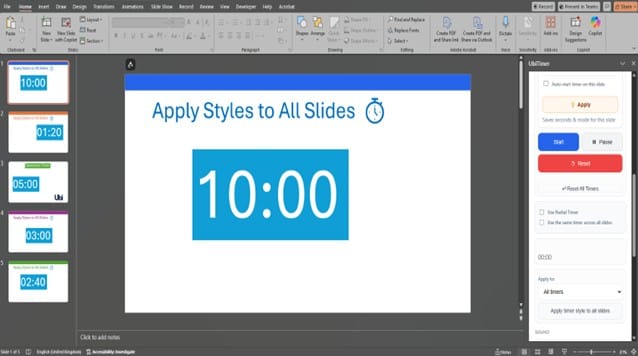
Why a PowerPoint timer for exams is harder than it looks
Many organisations rely on slide timers, animations, or external stopwatches. These approaches often fail because:
- Slide timers reset when slides change
- Animations run out of sync in Slide Show mode
- External timers aren’t visible to all candidates
- Internet-based tools fail in offline exam rooms
- Timing adjustments mid-exam are disruptive or impossible
In formal assessments, these issues can lead to complaints, unfair timing, or invalid results.
What a proper exam timer needs to do
- Stay synchronised across slides
- Be clearly visible to all candidates
- Work offline, without logins or accounts
- Allow invigilators to pause or adjust timing
- Avoid ads, pop-ups, or distractions
- Work consistently on Windows and macOS
UbiTimer was built specifically around these requirements.
How UbiTimer supports exams & assessments
🔒 Global, slide-independent timing
Run a single timer across the entire presentation, regardless of slide changes. This ensures fair and consistent timing from start to finish.
⏸️ Pause & resume when needed
Pause the timer during interruptions, instructions, or technical issues — then resume without resetting the clock.
📶 Works fully offline
No internet connection required. Ideal for secure exam rooms, training centres, and controlled environments.
👀 Clear, candidate-friendly visibility
Display the timer discreetly in a corner or prominently on screen, depending on your assessment rules.
🖥️ Designed for real PowerPoint usage
Built as a native PowerPoint add-in — no external windows, no unreliable browser overlays.
Suitable for a wide range of assessment scenarios
- Certification and accreditation exams
- Corporate training assessments
- University and higher-education testing (non-EDU licence)
- Professional body examinations
- Internal compliance tests
- Timed presentations and evaluation panels
If your organisation runs timed assessments in PowerPoint, UbiTimer fits naturally into your workflow.
Free vs Pro for exam use
| Feature | Free | Pro |
|---|---|---|
| Basic slide timer | ✔ | ✔ |
| Global exam-wide timer | ✖ | ✔ |
| Pause & resume control | ✖ | ✔ |
| Ad-free experience | ✖ | ✔ |
| Custom positioning & styles | Limited | ✔ |
| Suitable for formal exams | ✖ | ✔ |
For exams and assessments, Pro is strongly recommended.
Fair timing. Fewer disputes. More confidence.
A visible, reliable timer reduces candidate anxiety, invigilator intervention, disputes over remaining time, and post-exam complaints.
UbiTimer helps you standardise timing across sessions, rooms, and exam runs — without changing how you already use PowerPoint.
Further reading
UbiTimer is built as a native PowerPoint add-in, following Microsoft’s recommended Office Add-ins architecture for reliability and compatibility.
Further reading
UbiTimer is built as a native PowerPoint add-in, following Microsoft’s recommended Office Add-ins architecture for reliability and compatibility.
Learn more about how PowerPoint add-ins work directly from Microsoft: Microsoft Office Add-ins overview
For US-based organisations running formal assessments, ETS provides widely recognised guidance and standards around exam design and fairness: Educational Testing Service (ETS)
Running exams or assessments in PowerPoint?
View UbiTimer Pro pricing & features or Download and test in PowerPoint
UbiTimer runs locally in PowerPoint and does not collect or transmit exam data.